I've released many games for the Mac and Windows over the last 40 years or so. Some of these Hangman and Brickles games were first written about a year after the first Macintosh's were released. I've tried to update the games through the years to keep them working through all sorts of changes to the Mac hardware and Operating Systems, yet the games still retain the same 40-year old flavor of the original games.
It has been one of the great pleasures of my life to get all the positive feedback from customers about these games. I love it when I hear from users who say they grew up on these games and are now introducing them to their own kids. I hope you will continue to enjoy these games.
| Hangman Pro | Brickles Pro | Hangman Bible |

Hangman Pro for Macintosh and Windows
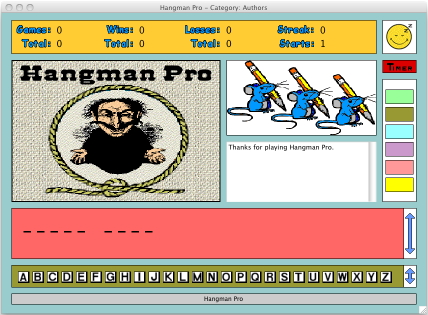
Hangman Pro is a modern take on the classic hangman game, the same one we all played when we were kids, on paper or on the blackboard at school. Hangman Pro is the classic word-guessing game. Hangman Pro is easy to play, and fun for all ages. Letters can be chosen using the mouse or the keyboard. Words can be selected from dozens of built-in categories, or you can enter your own words, or even enter whole vocabulary lists from school. Hangman Pro is a colorful, educational game with digitized sound effects, speech, non-violent graphics, a little cultural literacy, and whole lot more. Non-violent, family software at its best.

This reduced resolution screenshot shows a game already in progress. As you can see, the category is Shakespearean Phrases. The game shown here is two correct letter guesses away from being won. Can you guess the missing letters?
Hangman Pro now features dozens of categories of words (each with an amusing picture), such as Anatomy, Animals, Artists, Astronauts, Astronomy, Authors, Baseball Teams, Basketball Teams, Best Actors, Best Actresses, Best Pictures, Birds, Books, Canada, Cars, Cartoons and Comics, Chess, Christmas, Cities, Clothing, Colors, Composers, Computer Buzzwords, Constellations, Cosmetics Aisle, Cosmology, Countries, Country Music, Desserts, Dinosaurs, Dogs, Elements, First Ladies, Football Teams, Fruits, Hard Words, Hockey Teams, Insects, Islands, Jazz, Jewelry, Jobs, Magazines, Mars, Monsters, Musical Instruments, Mythology, Olympic Events, Operas, Planets, Presidents, Religion, Rock and Roll, Rocks and Minerals, Scientists, Shakespeare, Star Trek, States, State Capitals, Street Signs, Television Shows, Tools, Toys and Games, Trees, Universities, Vegetables, Vice Presidents, Weather, and Women in History. Truly something for everyone.
Hangman Pro is 35+ years old, but it can now be played on the latest of Macintoshes and Windows PCs. It runs on Intel-based Macs (using MacOS 10.10.5 and above, including the latest MacOS 11.0) as well as the very latest Apple Macintoshes using Apple's own Apple Silicon-based Macintoshes. Hangman Pro is now a 64-bit, code-signed, notarized Apple Universal Binary application.
Hangman Pro Requirements
Macintosh Requirements: Hangman Pro is a now a 64-bit, code-signed, notarized Universal Binary Macintosh application. It runs natively on both Intel-based Macintoshes running MacOS 10.5.5 and up, including the latest MacOS 11.0 as well as on the very latest Apple Silicon-based Macintoshes.
Windows Requirements: Hangman Pro works on virtually all Windows PC's (running Windows 7 SP1, Windows 8.1, Windows 10, etc.) and with a minimum screen resolution of 800x600.
Brickles Pro for Macintosh and Windows

Brickles Pro is a simple, addicting, ball and paddle game reminiscent of the breakout game of days gone by. It's a non-violent, colorful, sound-rich, customizable game. Brickles Pro features adjustable colors and patterns, adjustable ball and paddle sizes, adjustable speeds and adjustable window sizes. "Family Software with a Bounce!"
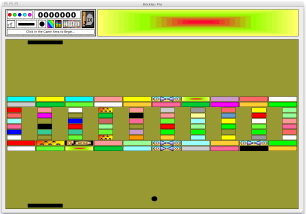
Brickles Pro can be played in a small or a large window, at full screen size, in a narrow or in a wide window. Brickles Pro includes stereo sounds, and various Brickles arrays. Each level of the game can feature a different randomly selected brickle array, or a favorite design can be played repeatedly. This picture (shown in reduced resolution) shows just one of the thousands of possible configurations of Brickles Pro.
Brickles Pro is 35+ years old, but it can now be played on the latest of Macintoshes. It runs on Intel-based Macs (using MacOS 10.10.5 and above, including the latest MacOS 11.0) as well as the very latest Apple Macintoshes using Apple's own Apple Silicon-based Macintoshes. Brickles Pro is now a 64-bit, code-signed, notarized Apple Universal Binary application.
| 1-Paddle Game | 2-Paddle Game | 4-Paddle Game |
|---|---|---|
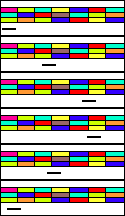 | 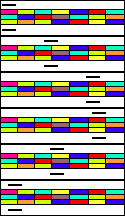 |  |

In addition to the standard 1-Paddle game, you can also choose a 2-Paddle or 4-Paddle game if you are up for a larger challenge. Choose a very slow speed while learning how to play the 2 and 4 paddle games. They are indeed challenging!
The Brickles Pro Toolbar

The Brickles Pro Toolbar controls aspects of the game. The top row (left to right) includes the Balls Remaining Indicator, the Score, and the Current Bonus (1X, at the moment.) The middle row includes the Speed Indicator/Switch, the Paddle Size Indicator/Switch, the Ball Size Indicator/Switch, the Random Color Generator Switch, the MultiColor Brickles Indicator/Switch, and the Brickle Array Design Indicator/Switch. The bottom row shows Game Messages (currently blank.)
Brickles Pro Requirements
Macintosh Requirements: Brickles Pro is a now a 64-bit, code-signed, notarized Universal Binary Macintosh application. It runs natively on both Intel-based Macintoshes running MacOS 10.5.5 and up, including the latest MacOS 12.0 as well as on the very latest Apple Silicon-based Macintoshes.
Windows Requirements: Brickles Pro for Windows does not require any kind of special hardware. A typical Windows PC running Windows XP, Vista, Windows 7 or Windows 10 should be just fine.
Note: The Old Brickles Pro Online Hall of Fame Scoreboard
In days (decades!) past, Brickles Pro included support for an online hall of fame scoreboard where local high scores (on your computer) could be shared with others around the world. In preparation for a new version of Brickles Pro, the Online scoreboard has been temporarily shut down. (Your local in-game Hall of Fame Scoreboard still exists as always.)
All shared Online High Scores over the years have been archived to honor those players who worked so hard to add their names to the Brickles Pro Online Hall of Fame. The First Archive includes scores from 1985 through mid-July of 2009. The Second Archive includes scores from mid-July of 2009 through mid-November 2016.
Hangman Bible for Macintosh and Windows

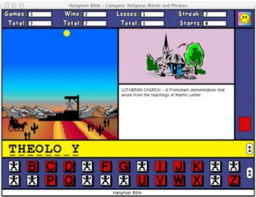
Hangman Bible is a religious-themed take on the classic hangman game. It's a colorful, family-oriented, educational game with digitized sound effects, speech, non-violent graphics, and more. Hangman Bible's categories include: Apostles, Bible Stories, Books of the Old Testament, Books of the New Testament, Christmas, Jewish Months, Popes, Religious Words and Phrases, Sacraments, Saints and Women in the Bible.
Hangman Bible Requirements
Macintosh Requirements: Hangman Bible is a carbonized Macintosh application, meant mostly for older PowerPC-based Macs. If it doesn't work on your Mac, you might be better served by purchasing Hangman Pro (see above), which DOES work with the latest Mac OS and is a much more fully-featured Hangman game.
Windows Requirements: Hangman Bible requires a typical Windows machine (95, 98, NT, ME, 2000, XP, Vista, W7, W10) with screen resolution of 800x600, or more.
Last Modified: May 6, 2026
